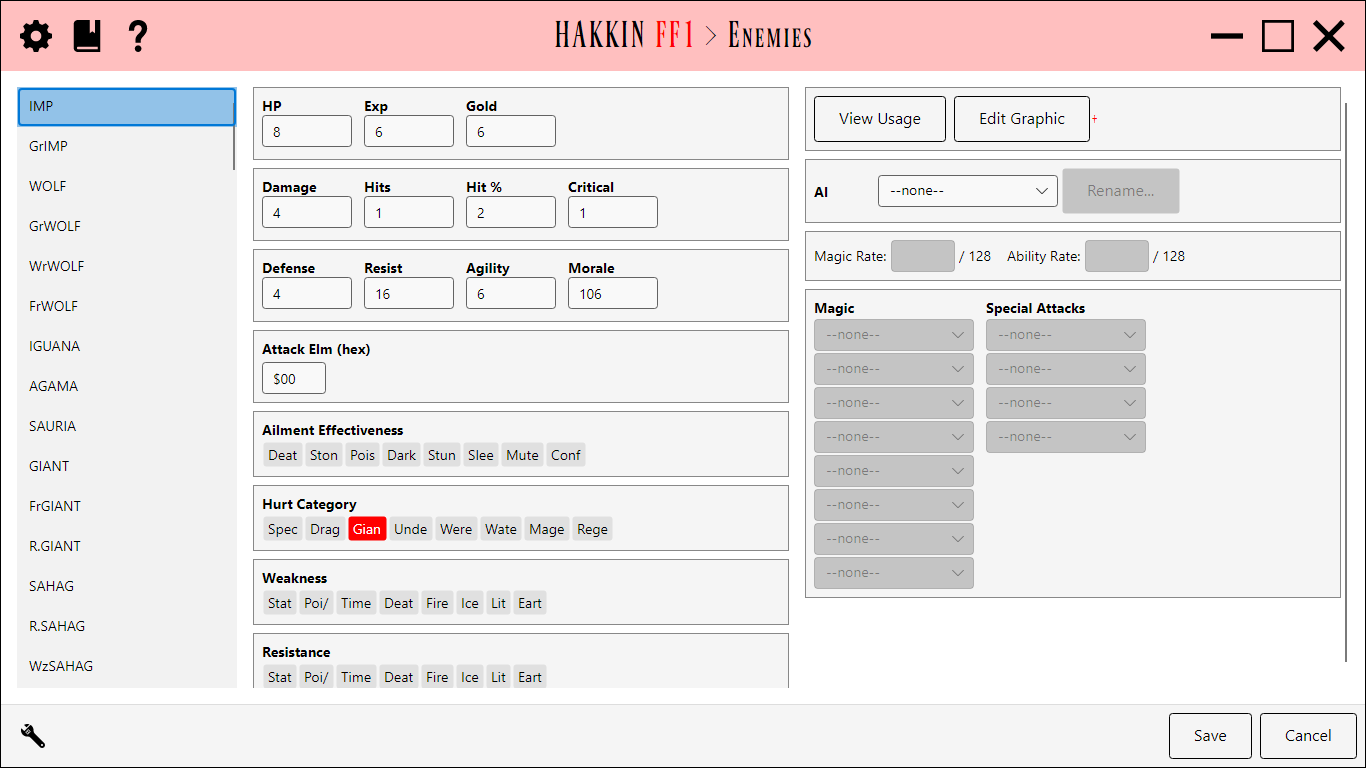
Edits the game's 128 enemies. The enemy list is on the left; enemy names come from the game's text, so you rename them in the Text editor (Enemies). The selected enemy's details are in two panels: stats and flags on the left, and graphic, AI, and attacks on the right.
The Enemies editor.
Stats
Field
Detail
Exp, Gold
The experience and gold the party gets for defeating it.
HP
Hit points.
Morale
How likely it is to run away.
Agility
Evasion.
Defense
Absorbs physical damage.
Hits, Hit %
Attacks per turn, and accuracy.
Damage
Attack strength.
Critical
Critical-hit rate.
Resist
Magic defense.
Flags
Field
Detail
Weakness
The elements that do extra damage to it.
Resistance
The elements it resists.
Ailment Effectiveness
The ailments its physical attacks inflict.
Attack Element
Byte 15 of the enemy record: the element of its physical attacks. It's shown either as eight flag chips or as a hex value, depending on the editor's settings, which can also rename it.
Hurt Category
Its enemy categories (Dragon, Undead, and so on), which weapons with matching Categories are strong against.
Graphic, AI, and attacks
Edit Graphic edits the enemy's picture. An enemy is drawn with the pattern table of the first battle it appears in, so that's the graphic this edits. See Enemy Graphic overlay.
AI chooses the enemy's AI script. AI scripts are shared, so enemies using the same script behave the same. Script names are project labels; Rename... changes them.
Magic Rate and Ability Rate are chances out of 128 that the enemy casts a spell or uses a special attack on its turn.
Magic and Special Attacks are the script's eight spells and four special attacks, used in order.
View Usage lists the battles the enemy appears in. See View Usage overlay.
Because AI scripts are shared, editing the rates, spells, or attacks here changes every enemy that uses the same script.
Settings
Setting
Default
Detail
Byte15AsFlags
off
Show byte 15 as eight flag chips instead of a hex value.
 Enemies