 Text
Edits the game's text: item, weapon, armor, spell, class, and enemy names, dialogue, battle messages, menus, the intro, the story, and the credits. Choose a section in the first list, then a string in the second, and edit it in the box beside them. Short strings get a single-line box, and dialogue and story text get a multi-line one.
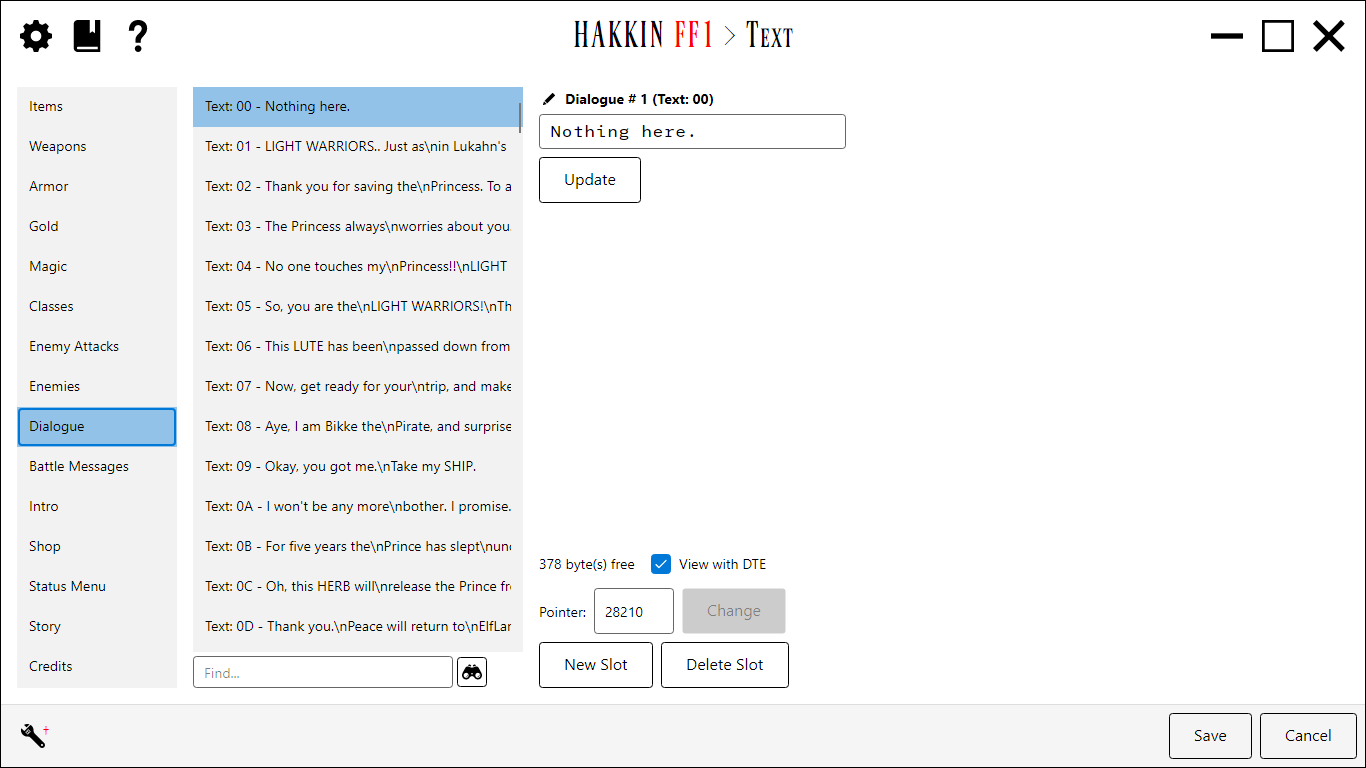
Sections
| Section | Contains |
|---|---|
| Items, Weapons, Armor, Gold, Magic, Classes | The names shown in menus and shops. These are the names the other editors display, read-only. |
| Enemy Attacks, Enemies | Special attack names and enemy names. |
| Dialogue | What townspeople and other sprites say. Which sprite says what is set in the Sprite Dialogue editor. |
| Battle Messages | Messages shown during battle. |
| Intro | The opening text. It's a single string, so there's no list. |
| Shop, Status Menu | Shop and menu text. |
| Story | The story pages. Extra controls set each page's screen position (X, Y) and the Prologue Last Page. |
| Credits | The four credit pages. Instead of a text box, each page is shown as rows of text runs that you edit one by one. |
Editing text
- When edits apply. Text is stored back to back, so making one string longer or shorter moves the strings after it. An edit is written into the ROM as soon as you confirm it: by clicking Update, selecting another string or section, or clicking Save. Cancel still undoes everything since you opened the editor.
- Pointer. Shows where the selected string is stored. Change re-points it, so several entries can share one string.
- New Slot / Delete Slot add or remove a string in sections that allow it.
- Find... searches the current section's strings. Click the button for the next match, or Shift-click it for the previous one.
- Rename Label renames the label shown for an entry in sections that use project labels.
View with DTE
The game compresses some text with DTE (dual-tile encoding), where a single byte stands for a common pair of characters. View with DTE switches the current section between showing those pairs expanded and showing the raw bytes. The choice is remembered for each section, per project. It starts on for the sections where the game uses DTE: Classes, Dialogue, Intro, Shop, Status Menu, and Story. It doesn't apply to Credits.
Credits checksum
The original game checks the credits text against a stored checksum. With Enforce Credits Text CRC on (the default), saving recalculates the checksum so edited credits still pass. Turn it off only for a hack that has already removed or changed that check.
Settings
| Setting | Default | Detail |
|---|---|---|
| ShowInGameDialogue | on | In the Dialogue section, list each entry by its text instead of only its number. |
| ShowInGameDialogueLength | 50 | How many characters of dialogue to show in that list. |
| ViewDte<Section> | varies | The View with DTE choice for each section (see above). |
| EnforceCreditsTextCRC | on | Recalculate the credits checksum on save. |