 Battles
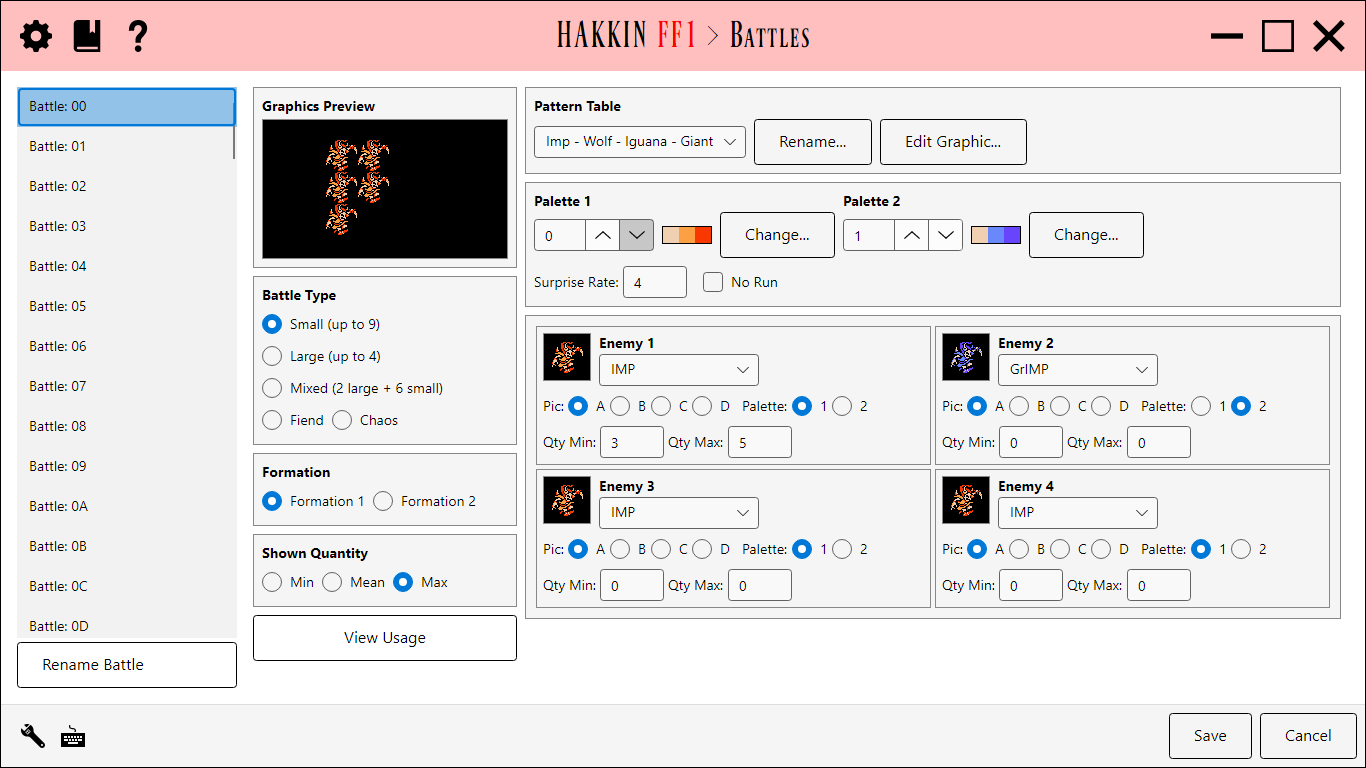
Edits the game's 128 battle formations: which enemies appear, how many of each, and how they're drawn. The battle list is on the left. Battle names are project labels, and Rename Battle changes them. The selected battle's details fill the rest of the page in two panels: what the battle looks like on the left, and the stored battle data on the right.
Graphics Preview
- The preview draws the battle with its real enemy graphics and palettes. Min, Mean, and Max show it with the fewest, an average, and the most enemies its quantity ranges allow.
- Battle Type: Small (up to 9), Large (up to 4), Mixed (2 large + 6 small), Fiend, or Chaos.
- Formation: the game can roll a battle in two ways, each with its own enemy counts. Choose Formation 1 or Formation 2 to see and edit the quantities for either.
- Shown Quantity: the Min/Mean/Max choice described above.
- View Usage lists every place the battle is used: world map domains, local maps' random encounters, fixed-battle tiles on local maps, and sprite dialogue that starts the battle. See View Usage overlay.
- Edit Graphic... opens the pattern table editor.
Battle data
| Field | Detail |
|---|---|
| Pattern Table | The set of enemy graphics the battle loads. It decides which enemy pictures (Pic) are available to the enemy slots. |
| Palette 1 / Palette 2 | The two enemy palettes the battle loads. Change... picks a different one from a preview of the available palettes. |
| Enemy slots A-D | Up to four enemy types, each with its enemy, its Pic and Palette choice, and Qty Min/Qty Max (how many appear). |
| Surprise Rate | How likely the party is to be ambushed. |
| No Run | Prevents the party from running away. |
Pattern table editor
Edit Graphic... opens the battle's pattern table: the enemy graphics, the palette, and a closeup for pixel editing, plus the Reshape and Repalette modes for Fiend and Chaos graphics. The Enemies editor opens the same overlay; it's described under Enemy Graphic overlay.
Settings
| Setting | Default | Detail |
|---|---|---|
| ViewUsage | on | Show the View Usage button. |