 Weapons
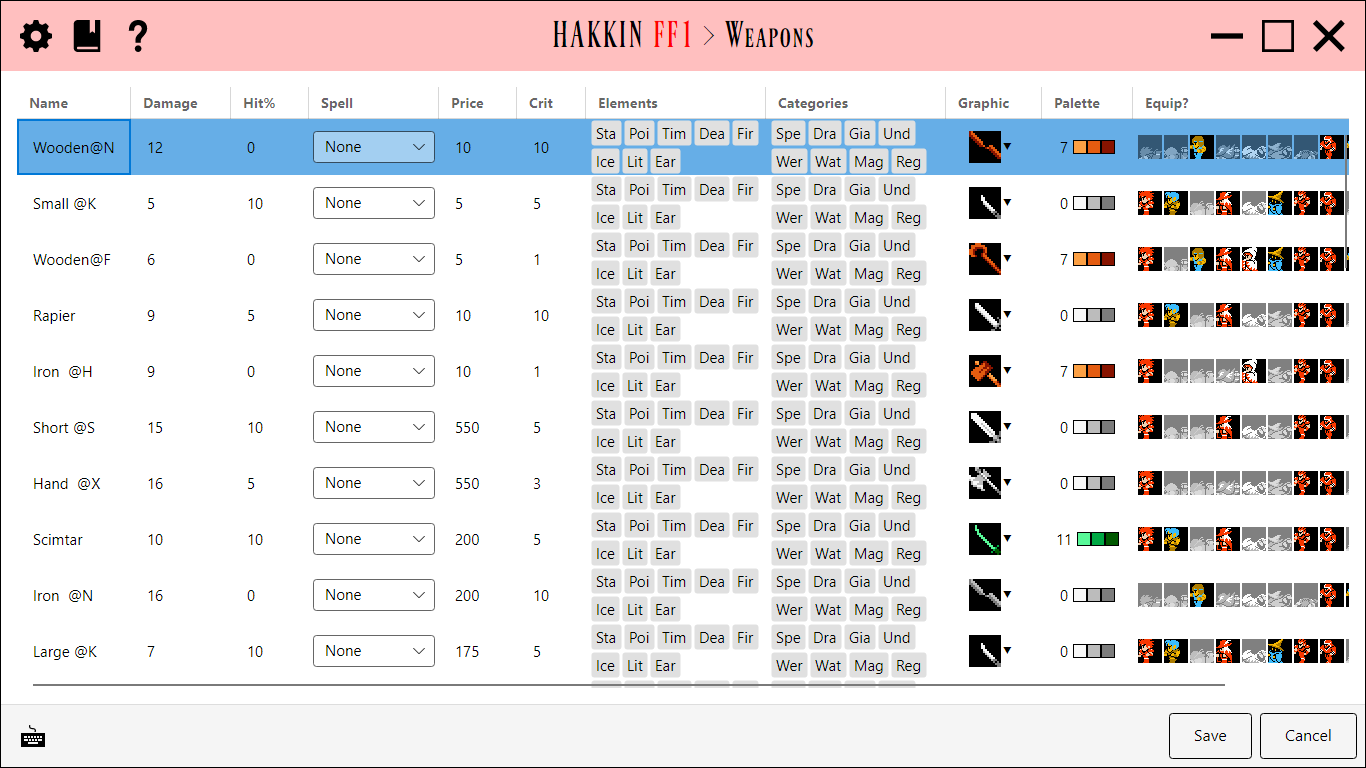
Edits every weapon in a single grid, one row per item, laid out like the Armor editor. It also covers the weapon's in-battle graphic and palette.
Fields
| Column | Range | Detail |
|---|---|---|
| Name | Read-only | The weapon's in-game name. Edit it in the Text editor (Weapons). |
| Price | 0-65535 | The purchase price. |
| Damage | 0-255 | The weapon's attack power. |
| Hit% | 0-255 | The accuracy bonus. |
| Crit | 0-255 | The critical-hit rate. |
| Elements | Flags | The weapon's elements. Click a chip to toggle it. |
| Categories | Flags | The enemy categories it's especially effective against (Dragon, Giant, Undead, Were, Water, Mage, Regenerative, and so on). |
| Spell | Dropdown | The spell cast when the weapon is used as an item in battle, or none. |
| Graphic | Picker | The swing graphic shown in battle. Click the thumbnail to edit the graphic's pixels in the Weapon Graphic overlay, or use the ▼ button to pick a different graphic in Select Graphic. |
| Palette | Picker | The colors used to draw the graphic. Click the swatches to choose one in Select Palette. |
| Equip? | Flags | Which classes can equip it, shown as each class's sprite. |
Weapon and spell graphics share the same pool of graphic slots, so the graphic editor and slot picker here are the same ones the Magic editor uses.